 ChiefGyk3D
Why YubiKeys Are More Essential Than Ever in the Age of AI and Malware
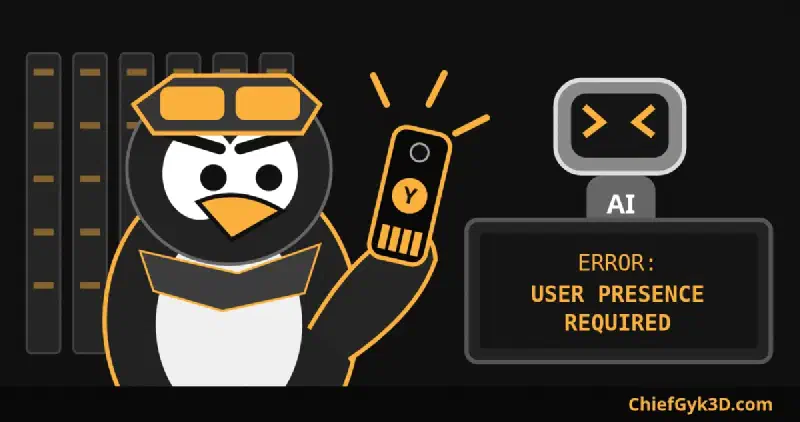
Automate the work, not the authority.
In an age where AI agents can execute terminal commands, write software, interact with infrastructure, navigate websites, and potentially be manipulated into performing actions they were never intended to perform, why are you still relying exclusively on software-based authentication?
Your passwords can be stolen. Your MFA codes can be phished. Your authenticator app can be compromised. Your browser sessions can be hijacked.
But an AI agent running on my computer cannot independently reach out and physically touch the YubiKey sitting on my desk.
What’s it going to do? Grow fingers?
Hardware security keys were already valuable long before generative AI became mainstream. If anything, AI is making the arguments for hardware-backed authentication even stronger.
Disclosure: I’ve been a Yubico ambassador for years. This article contains Amazon affiliate links. As an Amazon Associate, I earn from qualifying purchases. However, I’ve been using YubiKeys since the Mt. Gox Bitcoin days, long before I ever worked with Yubico. I would still be recommending them regardless of that relationship. This article also contains an affiliate link to Proton . I am a Proton affiliate and I do recommend them.
If you’re already looking to get started, here’s my YubiKey 5C NFC affiliate link . And before you buy anything, read the section below about why you should have at least two keys.
Almost everyone I know in cybersecurity owns a hardware security key. Most of us own several, and there’s a damn good reason for that.
Understanding the factors of authentication
Before we get into YubiKeys themselves, we need to understand what authentication actually is.
Authentication is the process of verifying a claimed identity. Traditionally, we categorize authentication into three primary factors:
- Something you know: A password, PIN, or passphrase.
- Something you have: A hardware security key, smart card, or authentication device.
- Something you are: A fingerprint, facial recognition, or other biometric characteristic.
Modern identity systems can also incorporate additional contextual and behavioral signals:
- Somewhere you are: Geographic location, IP address, or trusted network.
- Something you do: Typing patterns, behavioral biometrics, and historical usage patterns.
These additional signals are particularly useful in conditional access and risk-based authentication systems. Location and behavior are not automatically independent MFA factors under conventional authentication standards.
The important distinction is that using two passwords does not constitute two-factor authentication. Both are something you know.
Combining a hardware security key with a locally verified PIN, when the authentication protocol requires it, combines possession and knowledge. A touch by itself is a user-presence check, not biometric identity verification.
The objective is to introduce independent barriers that make impersonating you significantly more difficult.
Your MFA app is still software
I constantly encourage people to use MFA, even if the only option available is an authenticator app. But not all MFA provides the same level of protection.
SMS-based authentication can be compromised through SIM swapping, telecommunications attacks, and social engineering.
Time-based one-time passwords (TOTP), the six-digit codes most people associate with authenticator apps, can be captured through real-time phishing attacks.
Push-based authentication can be abused through MFA fatigue, where an attacker repeatedly sends authentication requests until somebody approves one. Number matching and other controls can mitigate some of this risk.
Malware can potentially compromise the devices generating or displaying these codes. Depending on the operating system, application, and permissions involved, malware may be able to capture screens, abuse accessibility services, steal authentication secrets, or hijack authenticated sessions.
None of this is particularly new. We’ve been dealing with variations of these attacks for years.
AI simply introduces another means of automating them, potentially making attacks more scalable, adaptive, and convincing.
Should you stop using authenticator apps?
Absolutely not. They are considerably better than having no MFA. But where stronger authentication is available, you should seriously consider using it.
What exactly is a YubiKey?
A YubiKey is a physical hardware security device capable of performing cryptographic operations and protecting sensitive authentication credentials.
It is not a USB flash drive with some passwords stored on it.
It contains dedicated security hardware designed to keep sensitive cryptographic material protected. Depending on the model, protocol, and configuration, private keys can be generated and used directly on the device without being exportable through its normal interfaces.
The YubiKey 5 Series supports an impressive collection of authentication and cryptographic technologies:
- FIDO2 and WebAuthn
- FIDO U2F
- Hardware-backed SSH authentication through compatible protocols and software
- OpenPGP
- PIV smart card authentication
- OATH-TOTP and HOTP
- Yubico OTP
- HMAC challenge-response
How much can a YubiKey actually store?
YubiKey 5 Series devices running firmware 5.7 or later support the following capacities:
| Credential type | Capacity |
|---|---|
| Discoverable FIDO2 passkeys | 100 |
| OATH-TOTP/HOTP credentials | 64 |
| PIV certificates | Up to 24, subject to available memory |
| OTP application slots | 2 |
These capacities are per application. You do not have to sacrifice your TOTP credential capacity to store additional passkeys.
Older YubiKey 5 Series devices generally support 25 discoverable FIDO2 credentials and 32 OATH credentials, so check the firmware version of the device you are purchasing. YubiKey firmware is not user-upgradeable.
Additionally, the 100-passkey limit applies to discoverable credentials stored on the device. Non-discoverable FIDO credentials, including traditional U2F registrations, do not consume those same storage slots.
See the YubiKey firmware overview and OATH technical documentation for model-specific details.
That’s a ridiculous amount of cybersecurity functionality packed into something you can carry on your keychain.
FIDO2 and WebAuthn: Why phishing resistance matters
One of the most valuable capabilities of modern hardware security keys is FIDO2 authentication.
Rather than giving a website a reusable password or manually entering a temporary authentication code, FIDO2 uses public-key cryptography.
When you register your hardware security key with a compatible service, a cryptographic credential is created. The service receives the public key, while the private credential remains protected by your authenticator.
During authentication, the authenticator signs data containing the service’s challenge. The legitimate service verifies the signature.
The really important part is that the credential is associated with the legitimate service’s identity. WebAuthn uses the relying party’s identifier and browser origin to bind authentication to the appropriate service.
If somebody creates a convincing copy of your banking website or corporate login portal on a different domain, the fraudulent website cannot simply use your FIDO2 credential to authenticate to the legitimate service.
Compare that with a six-digit authentication code that you can accidentally hand directly to an attacker.
This is why NIST’s authentication guidance distinguishes phishing-resistant cryptographic authentication from manually entered OTP codes, and why CISA encourages phishing-resistant MFA.
Passkeys based on FIDO2 can also provide phishing resistance without requiring a dedicated hardware key. However, I particularly value hardware-bound credentials because they give me an independent physical device that I can remove from my computer.
Protecting my SSH keys
As someone who works in cybersecurity, uses Linux, maintains a substantial homelab, develops software, and manages infrastructure, SSH is a significant part of my daily life.
Traditional SSH private keys are commonly stored on your filesystem. Encrypting them with a strong passphrase is important, but they are still files that could potentially be stolen.
Hardware-backed SSH authentication changes that security model.
Modern versions of OpenSSH support FIDO security keys using key types such as:
ed25519-skecdsa-sk
For example, with compatible hardware and software, you can generate a hardware-backed SSH credential using:
ssh-keygen -t ed25519-sk -O verify-required
The resulting local private-key file contains a credential handle rather than an independently usable software private key. Protect that file as well.
You can also use resident credentials, which make it easier to use the security key across multiple computers. For older hardware that does not support Ed25519 FIDO credentials, ecdsa-sk may be an alternative.
With appropriate user-presence and verification requirements, including server-side enforcement where needed, authentication can require both physical interaction with my YubiKey and PIN verification. OpenSSH also provides the verify-required authorized-keys option to enforce user verification on the server. Do not disable touch requirements merely for convenience.
An AI agent or piece of malware stealing files from my home directory cannot simply take that hardware-backed credential to another machine and start authenticating as me without the authenticator.
That is a significant improvement to the security model.
For implementation details, see Yubico’s FIDO2 SSH guide , the OpenSSH ssh-keygen manual , and the sshd manual .
OpenPGP: Protecting more than authentication
Another reason I like the YubiKey 5 Series is its OpenPGP support.
OpenPGP can be used for:
- Digitally signing messages and documents.
- Decrypting sensitive files and communications.
- Signing Git commits.
- Signing software releases.
- Authentication.
Rather than keeping all of my operational private key material directly accessible on my workstation, I can use a YubiKey to perform supported private-key operations. Encryption generally uses the recipient’s public key; the hardware protects the corresponding private-key decryption operation.
Touch policies can also be configured for individual OpenPGP key slots, requiring physical interaction before sensitive operations are performed. Cached touch policies and PIN caching may change when a fresh approval is required, so understand the configuration you choose.
Think about that in the context of AI-assisted software development.
I can have an AI agent generate code, run tests, review changes, and prepare commits without necessarily giving that agent independent access to my personal hardware-backed signing credentials.
I still retain control over the protected cryptographic operation.
Of course, a signature does not magically make bad code good. You still need to review what you are signing. A touch also does not guarantee that the host has presented the correct content to you.
PIV: Your YubiKey is also a smart card
PIV stands for Personal Identity Verification.
If you’ve worked in government, enterprise IT, or environments that heavily utilize certificate-based authentication, you’re probably familiar with smart cards.
The YubiKey 5 Series can function as a PIV-compatible smart card and participate in public-key infrastructure (PKI) workflows.
Depending on the infrastructure supporting it, this can include:
- Workstation authentication.
- Enterprise identity and access management.
- Certificate-based VPN authentication.
- Digital signatures.
- Certificate-based network access.
- SSH authentication through compatible middleware.
PIN and physical touch policies can also be configured for supported PIV operations. Set them deliberately when provisioning the keys, and understand the certificate issuance and revocation process.
This is another reason I consider the YubiKey substantially more than a device for logging into websites.
It is a portable cryptographic identity tool.
Even traditional authenticator codes can be hardware-backed
Unfortunately, not every website supports FIDO2 yet.
This is where Yubico Authenticator becomes useful.
Instead of storing your TOTP authentication secrets directly inside a conventional authenticator application, you can store them on a compatible YubiKey.
The application communicates with the hardware key to calculate and retrieve the authentication code. You can also configure supported credentials to require physical touch and protect access to the OATH application with an access password.
This provides additional protection against the theft of the underlying authentication secrets.
However, the generated six-digit code can still be phished or captured by malware. Hardware-backed TOTP is not equivalent to the phishing resistance of FIDO2.
Understanding that distinction is important.
The hardware improves protection of the secret, but it does not fundamentally change how the website validates the resulting code.
The dirty little secret about TOTP: It’s a shared secret
People often misunderstand how those six-digit authenticator codes actually work.
When you scan a QR code to enroll your authenticator, you are typically importing a shared cryptographic secret, commonly called a seed.
Your authenticator and the authentication server both possess that secret.
They independently calculate the same temporary authentication code using that seed and the current time, typically in 30-second intervals, as described in RFC 6238 .
The six-digit code changes. The underlying secret does not.
That distinction matters enormously.
If somebody obtains your TOTP seed, they can import it into their own authenticator and independently generate the same codes you generate.
- They do not need your phone.
- They do not need your YubiKey.
- They do not need to communicate with your authenticator.
- They do not need to trigger an MFA push notification.
- You receive no notification simply because they generated a code.
They could have a copy of your authenticator credential for months or years without you realizing it.
They may still need your password or another authentication factor to access your account, but your TOTP factor is effectively compromised.
Even if your YubiKey requires physical touch to generate a TOTP code, that requirement only applies to the copy of the secret stored on your particular YubiKey.
If an attacker already possesses the seed, your YubiKey’s touch policy means absolutely nothing to them.
This is fundamentally different from hardware-bound FIDO2 credentials, where the authentication server holds a public key rather than a copy of your private authentication key.
A stolen TOTP code is temporarily useful. A stolen TOTP seed remains useful until you rotate it.
If you suspect that someone has obtained your TOTP seed, you need to reset the affected MFA enrollment and generate a new secret. Review active sessions and account activity, and rotate other compromised credentials as appropriate.
This is why I prefer FIDO2 wherever it is supported.
How I securely back up my TOTP seeds
There is an interesting trade-off when using hardware security keys.
You want your authentication secrets to be difficult to extract, but you also need a disaster recovery plan.
YubiKeys do not provide a normal mechanism to export the TOTP seeds you have imported into them. That is intentional.
However, because TOTP relies on a shared secret generated outside the YubiKey, you can retain a securely protected copy of the original seed during enrollment.
This is where I take things a little further than the average person.
I often keep backup copies of my TOTP seeds in a KeePassXC encrypted database, which is itself stored inside an additional VeraCrypt container using a triple-encryption cipher cascade.
That encrypted container is backed up in three separate locations following the principles of the 3-2-1 backup strategy.
For those unfamiliar with the 3-2-1 rule:
- 3: Maintain at least three total copies of your important data, including the original and two backups. Three additional backups exceed this minimum.
- 2: Use at least two different types of storage media.
- 1: Maintain at least one copy offsite.
The idea is that a single disaster should not be capable of destroying every copy of your critical data.
A hardware failure, house fire, flood, ransomware infection, theft, or accidental deletion should not automatically mean permanent loss of your digital identity.
This is defense in depth combined with disaster recovery.
My approach is essentially:
- Use hardware-backed authentication for everyday operations.
- Maintain a separately enrolled backup hardware security key.
- Preserve necessary TOTP recovery secrets inside an encrypted KeePassXC database.
- Protect that database with an additional triple-encrypted VeraCrypt container.
- Maintain redundant copies across different media and locations.
- Test the recovery process periodically.
Is this excessive for the average person?
Probably.
But I work in cybersecurity, and I apply the same concepts of business continuity, disaster recovery, and defense in depth to my personal infrastructure.
There are also important precautions with this approach.
An encrypted backup containing TOTP seeds is an incredibly sensitive asset. Anyone who successfully decrypts it could potentially reproduce those credentials. Multiple encryption layers do not protect you from malware that can access the contents while those layers are unlocked. A cipher cascade is not a substitute for a strong passphrase, sound key management, or an uncompromised system.
Use strong, independent passphrases, keep recovery secrets separate from everyday passwords where practical, avoid unnecessarily mounting or unlocking the backup, and maintain at least one offline or immutable copy.
Do not leave the original enrollment QR codes sitting in your photo gallery, downloads directory, email, or unencrypted cloud storage.
Also make sure that recovering your encrypted backup does not require the very same credentials you are trying to recover. Otherwise, congratulations, you’ve engineered yourself into a circular dependency.
Your disaster recovery plan should not require a miracle to execute.
For most people, two independently enrolled hardware keys for FIDO2 and securely stored account recovery codes will be a much simpler starting point. For TOTP-only accounts, enroll both keys from the same seed during setup or retain an appropriately protected recovery method.
My additional encrypted TOTP backups are for situations where I need more control over the long-term recoverability of shared secrets.
But I already use a password manager!
Congratulations. So do I.
I use Proton Pass , Bitwarden, and KeePassXC for different purposes, and I’ve been using password managers alongside YubiKeys for years.
Password managers and hardware security keys are not mutually exclusive.
Password managers help me generate and maintain unique, high-entropy credentials across services. They reduce password reuse and provide encrypted credential storage.
Hardware security keys help strengthen authentication and protect cryptographic operations.
Some password managers also support passkeys, hardware-backed authentication, or challenge-response functionality, depending on the product.
KeePassXC, for example, supports YubiKey HMAC-SHA1 challenge-response for protecting database access when configured appropriately. If you rely on it, plan a recovery strategy before you lose the key.
You also need to consider what happens if your password manager stores both your password and your TOTP seed.
That is convenient, and it still provides meaningful protection against many remote attacks. However, if an attacker gains access to the unlocked vault, they could potentially obtain both authentication factors.
It is a concentration of risk.
For particularly sensitive accounts, I prefer keeping everyday authentication secrets and recovery material independently protected.
I don’t want to rely entirely on one application, one device, or one security mechanism for everything.
Security is about layers.
They’re teammates, not competitors.
Why AI makes physical authorization increasingly important
If you follow my content, you know that I’m not opposed to AI.
I run local language models, build AI agents, automate infrastructure, and experiment extensively with AI-assisted development and cybersecurity workflows.
But there’s a significant difference between giving an AI agent the ability to perform work and giving it the authority to perform every action that I can.
An AI agent might be able to:
- Write and execute scripts.
- Read files and environment variables.
- Interact with browser sessions.
- Access available APIs.
- Modify infrastructure.
- Interact with credential stores available to its process.
- Perform unintended actions after encountering a malicious prompt or compromised tool.
These capabilities are useful, but they also introduce a substantial security consideration.
What happens when an agent is compromised, manipulated, or simply makes an incorrect decision?
This is where concepts such as least privilege, workload identities, secrets management, network segmentation, and human approval become increasingly important.
A properly configured hardware security key can create a physical boundary that software cannot independently satisfy.
An AI agent can request a protected cryptographic operation, but if the key requires a fresh physical touch, the agent cannot produce that touch through ordinary software commands.
That is precisely the kind of separation I want between my automated systems and my personal administrative identity.
My agents should have their own narrowly scoped identities, credentials, and permissions. They should not simply inherit mine. Unattended automation should use scoped workload identities rather than my personal hardware-bound credentials. Sensitive changes should also require authorization at the service or workflow level, not simply a key touch on a potentially compromised host.
The same principle applies to conventional malware. I do not want an infostealer to be able to download my entire digital identity simply because it compromised my workstation.
Automate the work. Not the authority.
A YubiKey does not make you invincible
Before somebody inevitably starts typing an objection in the comments, let’s establish what hardware security keys cannot do.
A YubiKey cannot automatically prevent:
- Theft of an already authenticated browser session.
- Malware operating within an existing SSH connection.
- Compromise of an endpoint.
- Theft of API tokens available to an AI agent.
- Social engineering that convinces you to approve a malicious request.
- Account recovery mechanisms that bypass stronger authentication.
- Compromise of externally stored TOTP seeds.
- Vulnerabilities in the applications and infrastructure you use.
Physical touch is evidence of user presence, not necessarily proof that the user understands what they are approving. A compromised host may still request a malicious signature or authentication and trick you into touching the key.
A normal YubiKey touch sensor is also not a fingerprint reader. Biometric verification is available on specific YubiKey Bio models.
Additionally, not every YubiKey function requires physical touch by default. OpenPGP and PIV, for example, have configurable touch policies that you should understand before relying on them as security controls.
Buying a hardware security key and configuring it properly are two entirely different things.
You still need endpoint security, patch management, least privilege, session management, backups, and common sense.
Defense in depth remains defense in depth.
For the love of Tux, buy at least two
This is probably the most important piece of advice I give anyone considering a hardware security key.
Do not buy just one.
Buy at least two.
One is your primary key. The other is your backup.
Register both independently with your accounts wherever FIDO2 is supported, test both, and keep the backup somewhere secure and physically separate from your primary key.
No, you cannot simply clone a YubiKey. That is part of the security model.
Hardware-generated FIDO credentials are not designed to be exported and copied onto another device. Each hardware security key needs its own enrollment with the services you use.
Other protocols have different recovery considerations:
| Technology | Backup strategy |
|---|---|
| FIDO2 / U2F | Register each security key separately. |
| SSH | Generate and authorize separate hardware-backed credentials. |
| OpenPGP | Establish a secure key backup and revocation strategy before provisioning operational keys. If a private key is generated on hardware and is non-exportable, plan for separate keys or replacement and revocation rather than assuming you can recover it. |
| PIV | Provision backup credentials and establish certificate revocation and recovery procedures. |
| TOTP | Enroll both keys using the original shared secret or maintain a securely encrypted copy of the seed. |
| Challenge-response | Securely preserve the original shared secret or configure an appropriate recovery method. |
Some externally generated credentials can be provisioned onto multiple devices, but that does not mean you can extract and duplicate an entire YubiKey after the fact. Yubico explains this distinction in its credential backup documentation .
Also, keep your account recovery codes somewhere secure.
If you lose or destroy your only hardware key without an alternative authentication or recovery method, you may be completely S.O.L.
We talk about business continuity and disaster recovery constantly in enterprise cybersecurity.
Why would you not apply those same principles to your own identity?
Redundancy is not just for servers, storage arrays, network infrastructure, and internet connections.
Your identity needs redundancy too.
Which YubiKey should you buy?
For most people primarily interested in protecting online accounts, the Security Key Series by Yubico provides FIDO2 and U2F authentication.
For developers, system administrators, cybersecurity professionals, Linux users, and homelab enthusiasts, I generally recommend the YubiKey 5 Series because of its broader protocol support.
| Capability | Security Key Series | YubiKey 5 Series |
|---|---|---|
| FIDO2 / WebAuthn | Yes | Yes |
| FIDO U2F | Yes | Yes |
| Hardware-bound passkeys | Yes | Yes |
| FIDO-backed SSH (compatible software) | Yes | Yes |
| TOTP / HOTP | No | Yes |
| OpenPGP | No | Yes |
| PIV smart card | No | Yes |
| HMAC challenge-response | No | Yes |
| Yubico OTP | No | Yes |
USB-A, USB-C, and NFC options are available, depending on the model.
Check compatibility with your devices and the services you intend to protect before purchasing. If credential capacity matters to you, check the firmware version as well.
Get a YubiKey 5C NFC through my Amazon affiliate link .
As an Amazon Associate, I earn from qualifying purchases.
And again, buy two if you’re going to rely on them.
Where should you start?
If you’re new to hardware security keys, I would prioritize securing the accounts that could be used to compromise everything else.
- Your primary email accounts.
- Your password manager.
- Your identity provider.
- Your financial accounts, where supported.
- Your GitHub and other development accounts.
- Your domain registrar and cloud infrastructure.
- Your administrative accounts and remote access systems.
- Your social media accounts.
Start with FIDO2 wherever available, register both hardware keys, and verify that your recovery process works.
Review your fallback authentication methods too. There is little point in implementing strong phishing-resistant authentication if an attacker can simply bypass it through a weaker recovery mechanism. Remove unnecessary weaker fallback methods when the service allows it, but make sure you have a tested recovery path first.
Then start exploring hardware-backed SSH, OpenPGP, PIV, and the other capabilities if they are relevant to your environment.
The future of authentication is not exclusively software
The irony of an increasingly automated world is that physical interaction may become an even more valuable security control.
We are developing systems that can reason, execute commands, interact with applications, and perform increasingly complex tasks with minimal human intervention.
That’s incredibly powerful.
But I do not want to eliminate human intervention from every part of my security architecture.
There are places where friction is desirable. There are places where requiring physical possession is beneficial. There are places where a human should explicitly retain control.
Hardware security keys were valuable in the age of conventional malware. They remain valuable in the age of increasingly capable AI agents.
I’ve been using YubiKeys for well over a decade, and I don’t see myself abandoning that security model anytime soon.
Protect your secrets. Understand your authentication protocols. Maintain backups. Test your disaster recovery plan.
And buy at least two damn YubiKeys.
Stay curious. Stay paranoid. Stay secure.
Further reading
- NIST SP 800-63B: Authentication and Authenticator Management
- YubiKey Technical Manual: Firmware Overview
- YubiKey Technical Manual: Firmware 5.7
- YubiKey Technical Manual: OATH Credentials
- Yubico: How to Back Up OATH Credentials
- RFC 6238: Time-Based One-Time Password Algorithm
- Yubico: Securing SSH with FIDO2
- Yubico: PIN and Touch Policies for PIV
- OpenSSH ssh-keygen Manual
- OpenSSH sshd Manual
- KeePassXC
- VeraCrypt
- CISA: More Than a Password